About and legal - Usage
The About and legal component appears when users click on the "About and legal" item (1) and overlays the current content. Closing this overlay brings users back to the original content.
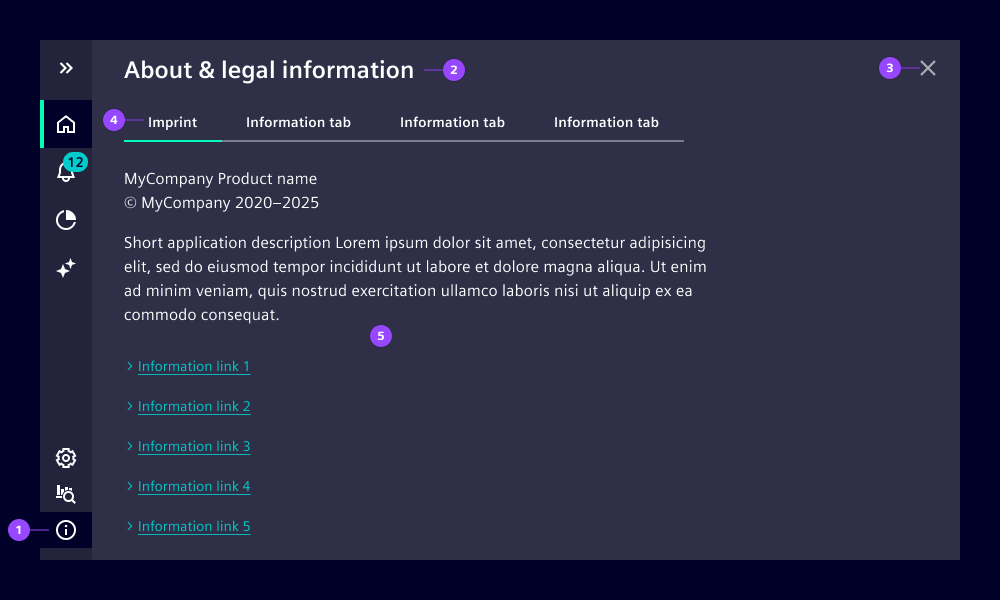
- Application menu item - info
- Content header
- Close button
- Tabs
- Changeable content
Options
- Tabs: Use tabs with meaningful labels to separate content into categories.
- Label: Title that is shown in the content header. We recommend using the default "About & legal information" wording.
- Content: Add information about the application, e.g. version, author, copyright. It can also include legal information, e.g. terms of service, privacy policy.
Behavior
Overlay opens on top of application content with a semi-transparent background with a background blur effect to emphasize the overlay character. Closing this overlay brings users back to the previous content.
The overlay can be closed in three ways:
- Select the close button.
- Click the info icon again.
- Click another navigation item.
When the navigation menu is collapsed, the overlay stays open.
The About and Legal components require specific content to comply with Siemens AG regulations. The official content and guidelines are exclusively available for Siemens AG employees and can be accessed here.