Chat - Usage
Chats are the outer containers that bring together the three building blocks of a conversational thread: Chat input at the bottom for writing and sending prompts, user messages that show what users submitted and AI messages that display AI responses.
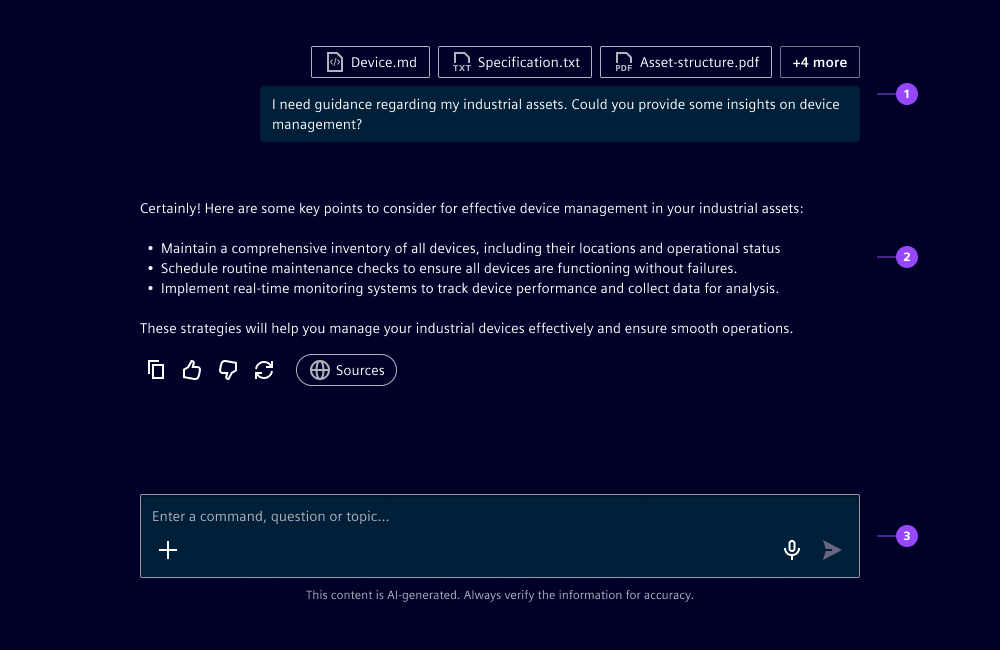
Behavior in context
- Placement: We recommend placing the chat either in the main content or in panes depending on the user goals:
- Main content: Use when the chat is the main focus of the experience, e.g. standalone or workspace copilots
- Panes: Use when the chat is a secondary feature, e.g. for contextual help
- Responsiveness: Chats will resize to a max-width of
45rem.
Dos and Don’ts
- Do enable auto-scroll when users are reading the current response, not when they are reading previous responses
- Don't add limits to how many messages are visible, instead always display full chat sessions
Related
- Chat input
- User message
- AI message
- Conversational design guidelines
- SDL AI UX Guidelines (Siemens AG internal resource)