Textarea
Guidelines Development
Guidelines
The textarea component allows users to input multi-line text, making it ideal for forms that require longer entries. We typically use textareas in scenarios such as feedback forms, comment sections and message composition.

- Label
- Required field indicator
- Placeholder
- Container
- Resize handle
- Helper or feedback text
- Counter
Options
- Label: See form field.
- Value: See form field.
- Required: See form field.
- Helper text: See form field.
- Feedback text: See form field.
- Show text as tooltip: See form field.
- Placeholder: See form field.
- Counter: See form field.
- Resize behavior: Determines how textareas can be resized (both directions, horizontally, vertically, or no resizing). Default size is 300px x 100px.
- Columns and width: Defines initial width by number of columns and/or width.
- Rows and height: Defines initial height by number of rows and/or height.
Behavior in context
- Interaction:
- Clicking in the container enables the editing of the field.
- Users can type, copy, paste and cut text within textareas.
- Optional: Users can resize textareas to fit their needs. For example, vertical resizing can be useful in feedback forms when the entry exceeds the default height.
- Validation:
- Minimum and maximum length defines number of characters allowed.
- See form validation.
- Overflow: Text within the textarea is not truncated; it supports scrolling for overflow content.
- Alignment: Text is always left-aligned in textareas.
- Sizing:
- Use columns and rows when you want to define the size of the textarea based on the number of characters (columns) and lines (rows) it can display. This is particularly useful for textareas where the content length is predictable, such as input fields with character limits.
- Use width and height when you need to specify the exact dimensions of the textarea in terms of pixels, rems or other units. This is ideal for ensuring consistent layout and design across different screen sizes and devices, especially in responsive designs.
States
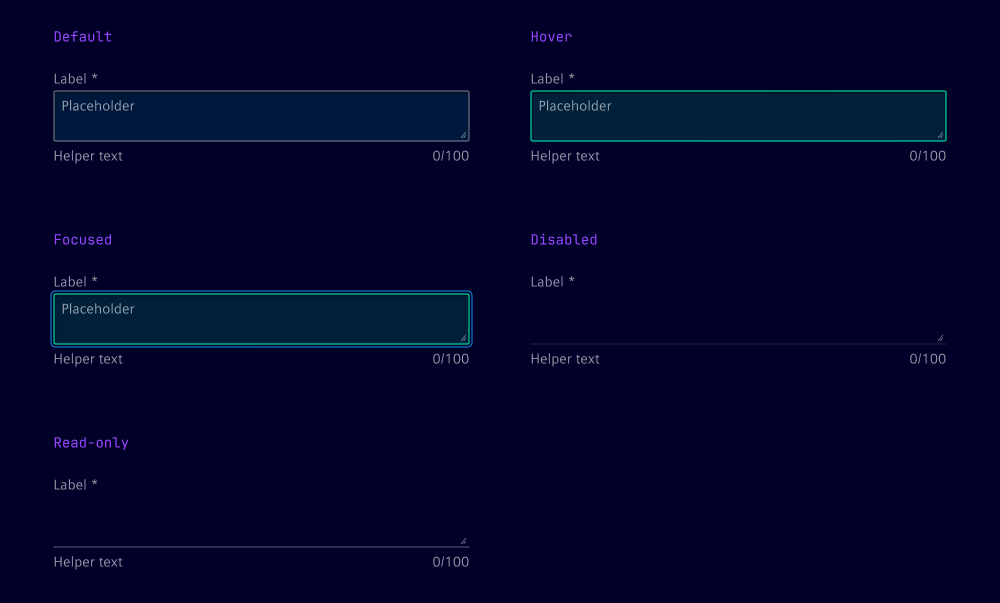
Textareas have five states: Default, hover, focused, read-only and disabled.
Dos and Don’ts
- Do ensure the textarea size matches the expected input, e.g. 5 to 10 rows for detailed feedback
- Do use the placeholder to give users an example of the expected input
- Do set minimum and maximum character limits to ensure appropriate input length
- Don’t use the textarea for short, single-line input like name or email address, use an input field instead
Related patterns
Development
Examples
Basic
Disabled
Readonly
Resize behavior
Validation
API
Properties
Name
Description and specifications
disabled
Determines if the textarea field is disabled.
Attribute:
disabledType:
booleanDefault:
falsehelperText
The helper text for the textarea field.
Attribute:
helper-textType:
string | undefinedinfoText
The info text for the textarea field.
Attribute:
info-textType:
string | undefinedinvalidText
The error text for the textarea field.
Attribute:
invalid-textType:
string | undefinedlabel
The label for the textarea field.
Attribute:
labelType:
string | undefinedmaxLength
The maximum length of the textarea field.
Attribute:
max-lengthType:
number | undefinedminLength
The minimum length of the textarea field.
Attribute:
min-lengthType:
number | undefinedname
The name of the textarea field.
Attribute:
nameType:
string | undefinedplaceholder
The placeholder text for the textarea field.
Attribute:
placeholderType:
string | undefinedreadonly
Determines if the textarea field is readonly.
Attribute:
readonlyType:
booleanDefault:
falserequired
Determines if the textarea field is required.
Attribute:
requiredType:
booleanDefault:
falseresizeBehavior
Determines the resize behavior of the textarea field.
Resizing can be enabled in one direction, both directions or completely disabled.
Attribute:
resize-behaviorType:
"both" | "horizontal" | "none" | "vertical"Default:
'both'showTextAsTooltip
Determines if the text should be displayed as a tooltip.
Attribute:
show-text-as-tooltipType:
boolean | undefinedtextareaCols
The width of the textarea specified by number of characters.
Attribute:
textarea-colsType:
number | undefinedtextareaHeight
The height of the textarea field (e.g. "52px").
Attribute:
textarea-heightType:
string | undefinedtextareaRows
The height of the textarea specified by number of rows.
Attribute:
textarea-rowsType:
number | undefinedtextareaWidth
The width of the textarea field (e.g. "200px").
Attribute:
textarea-widthType:
string | undefinedvalidText
The valid text for the textarea field.
Attribute:
valid-textType:
string | undefinedvalue
The value of the textarea field.
Attribute:
valueType:
stringDefault:
''warningText
The warning text for the textarea field.
Attribute:
warning-textType:
string | undefinedEvents
Name
Description and specifications
ixBlur
Event emitted when the textarea field loses focus.
Detail:
voidvalidityStateChange
Event emitted when the validity state of the textarea field changes.
Detail:
ValidityStatevalueChange
Event emitted when the value of the textarea field changes.
Detail:
string